Tuesday, March 13, 2012

Moser Baer launches credit-card style USB drive


Not a long time time ago money was mostly in alloy and paper. Let’s say an amount of Rs.5 lacs could only fit in a suitcase. A rectangular piece of plastic changed it all. The credit card became the new face of money. Rs. 5 lacs or even Rs.10 lacs or even more fit in that little piece of plastic less than weighing less than 10 gms that fits in the wallet. Technological innovations are fascinating. Somehow they head for the wallet! The latest to head for the wallet is memory.
Memory that started from the good old days of tape drives. Many innovations later came the hard disc. Suddenly someone decided he wanted to carry the load of memories wherever he went, without the burden of course! Out came a Flash Drive. Man always wants the best of both worlds i.e. memory without the burden of carrying it. A Flash Drive also meant a load, even if it was just maybe 100 gms. Now out comes India’s first ‘credit card-shaped’ USB Flash Drive by Moser Baer, weighing more of less the same as a credit card.

The Specifics
Launched last week, Moser Baer Zap pocket flash drive comes with 4 GB memory, measures 84.15 X 52.83 sq. mm and weighs just 10.25 gms. It fits in the wallet easily and can easily be mistaken for a credit card. With USB 2.0 interface (direct plug-n-play), it is compatible with Win 2000/XP/ME/Vista/7, Mac OS 9.0 or later versions and Linux Kernel 2.4.0 and higher versions.


The Good and the Bad
Price - Priced at MRP Rs. 1,100 the price is super high. In comparison an ordinary pen drive like Transcend JetFlash 500 4 GB comes for just Rs.255 at Flipkart.com and San Disk at around the same price of under Rs.300. Moser Baer may argue it has size on its side but even that argument goes void when you already have Transcend Jet Flash V90C 4 GB Pen Drive priced at Rs. 397 or a PNY Lovely Attache 4 GB Pen Drive (Blue) that comes at Rs.233 on Flipkart.com. 

Ofcourse Moser Baer Zap has looks, aesthetics and convenience but even then Rs.1,100 is very high even if it is being charged for the novelty of being like a credit card. Having said that Apple charges a bomb for its aesthetics. So its a personal decision for the buyer on what he chooses, the functionality or aesthetics or a combination of both. However the good news is the product is available athttp://shop.moserbaer.in (at a special introductory price of INR 399/. At Rs.399/- it maybe worth it. 

Convenience - Convenience wise Moser Baer Zap is super good. It fits it easily in the wallet. Even the USB interface is made in a way that it is as thick as a credit card
Storage - At 4 GB, its a decent option. It means suppose you have pictures taken from a 5 mega pixel camera you can carry around 3000 pictures in this credit card pocket drive.

Aesthetics
The aesthetics are good. It looks like a credit card. Interestingly the credit card shape gives the much needed safety feature to the USB interface and keeps it safe when folded. Moser Baer says Zap is rugged in design, design wise yes but insertion wise it needs to be handled with care .

Warranty - It has been introduced with a warranty of 2 years. However what needs more clarification is the safety of data. For example when you buy a San Disk pen drive there is a certain reliability you get with the brand. Moser Baer capabilities so far lie in optical storage media like CDs and DVDs . Hopefully the same reliability will come in its new line of products.

The Last Word
Google used scarcity to create demand (remember Gmail only by invitation) and it was a success. However the same strategy didn’t work for its newer launches. Same is with dual pricing. This system of dual pricing Rs.1,100 as printed price and “introductory” at Rs.399/- I wonder if it is taken seriously by customers. Anyways these days it matters less what is printed on the pack. The Flipkarts and Infibeams of the world will anyway level the pricing right. Overall a convenient product. Moser Baer Zap at Rs.399 maybe worth it, at Rs.1,100 it is not.

-HT

Monday, March 12, 2012

HTC Rhyme Review


The HTC Rhyme is a device aimed primarily at women, even if HTC may try to tell you otherwise. From the choice of colors available for the phone, such as plum, light green and beige to the fact that it comes with an accessory called Charm, which is meant to be clipped to your bag or purse and inform you of pending notifications by glowing softly, it’s easy to tell that the phone was designed primarily with women in mind. And while some of you may dismiss it because of this or because on paper it seems to have fairly run of the mill hardware, that would be a grave mistake on your part, as I shall explain below.

Design
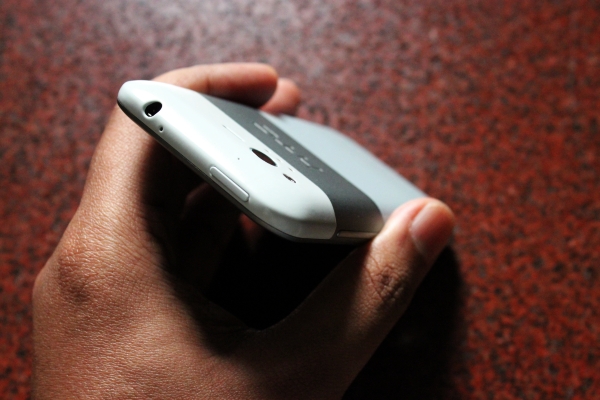
The Rhyme has a simple yet elegant design that is unmistakably HTC. There are two main design elements here. The first is the metal chassis, which can be seen around the display on the front and as a thick band in the middle on the back. It bisects the two plastic portions, that form the other major part of the design. Each of these plastic portions have a slightly different color than the metal, giving the rear a nice three-tone finish.


The metal portion has a lovely smooth matte finish to it but the plastic portions don’t nearly feel as good to look at or touch. The build quality all around, though, is top-notch. I especially liked the size of the phone, which thanks to the 3.8-inch display, was quite manageable and fit perfectly in my hands. If you too are tired of seeing gigantic Android smartphones then you should give this one a try.


The design of the Rhyme has one flaw, however: the battery is non-removable. You access the SIM card and the microSD card by sliding open the plastic portion at the bottom of the phone but those are the only things you will be able to access. 


The Rhyme in India, unfortunately, only comes in one color called Clearwater, as seen in these pictures. Also, it lacks the desktop dock that is part of the phone sold elsewhere in the world. You still get the Charm accessory, though. The Charm is basically a sugar cube sized object at the end of a cable that plugs into the headphone jack. It has a clip for attaching to your bag and glows when you have a missed call or message. While this will definitely be convenient for women who put their phones in their bags it does have a couple of issues. First of all, the Charm is useless under the Sun, where you won’t be able to see it glowing. Secondly, when it’s indicating a missed notification, the blinks a bit too quickly, so it’s easy to miss. It would have been better if it had a slower, breathing pattern to the glow, which would have made it more noticeable. The Charm also uses the headphone jack, which means you can’t have both this and a pair of headphones connected at once.

Display
The HTC Rhyme has a 3.7-inch 800 x 480 resolution TFT LCD. The display is protected by Corning’s Gorilla Glass on top, which gives it added protection from scratches. The quality of display is commendable; it looks fairly sharp, the colors look vibrant and the white balance is spot-on. The display is also sufficiently bright so it remains visible under sunlight. Only problem with it are the viewing angles, which aren’t quite as good as AMOLED or IPS displays. 

Hardware and Software
The HTC Rhyme has a 1 GHz Qualcomm Snapdragon MSM8255 processor and 768MB of RAM, which is quite sufficient from everything from your run of the mill applications to 3D games. I tested the phone with a variety of apps and games and I didn’t find the phone lacking in any of them. Sure, things like ‘1.5GHZ Processor!!!’ and ‘Dual Corezz!!’ sound very impressive on paper but most of the time you don’t really need all that power. So even though on-paper the Rhyme might not seem all that impressive in real-world usage it performs just fine. 

On the software side the Rhyme is running HTC Sense 3.5 on top of Android 2.3.5 Gingerbread. The OS is outdated now but the Sense skin does a commendable job of hiding that fact. Compared to the previous versions of Sense UI, HTC has trimmed down some fat, which makes it look less gaudy and pretentious. It now sports a simpler and more sophisticated look, that actually goes really well with the hardware. HTC has also smoothened out the frame rate, which looks less jerky while scrolling through the menus although it’s still not as smooth as I’d like.


Among the list of changes include a new homescreen, that has two fixed buttons below for the dialler and the application drawer. The default clock widget has been changed in favour of a new digital clock with sliding drawers on the side, although the old clocks still exist in the widgets drawer. The menus have a new grey background that looks better than the plain black in the previous versions. But what I like most about the Sense UI is the lock screen, which makes quickly launching applications from the lockscreen a cinch. 


Some frivolities still exist, however, such as the way the homescreens spin if you flick them too hard or the way the Gallery app launches the icons with a flourish instead of simply displaying them and saving a second. 

Multimedia
The HTC Rhyme has a 5 megapixel camera with auto-focus, LED flash and 720p video recording. The camera applications is simple and easy to use and has all the basic features including continuous auto-focus and touch-to-focus. The quality of camera is quite good with daylight shots in particular coming out well. The level of details was quite astonishing but the images also had a healthy amount of noise in them but not enough to ruin them. 


Videos, however, are a different matter altogether. The videos were jerky and terribly pixellated. Dropping the resolution to 480p improved the quality a bit but they were still pretty horrible. Initially I assumed that it was just a problem with the device I received but checking out a few videos online confirmed that it was indeed a problem with this phone in general. 


Moving on to music playback, the phone fared quite well here. The default music player looks nice and also comes with the option of multiple audio presets but I was disappointed to see a lack of FLAC support. HTC provides a pair of in-ear earphones that also have controls on it to adjust the volume and switch tracks. The cables feature a flat, pasta-like cables that are designed to be tangle free. As for the audio quality, it wasn’t exactly to my taste because it was too bass heavy and had little in terms of high-end clarity but I’m assuming most people these days prefer such sound. The loudspeaker on the other hand was the exact opposite, with clean and clear sound but lacked any semblance of bass. 


The video player on the Rhyme is built-into the Gallery app. It will play your AVI files just fine but throw in some MKVs and the phone refuses to even acknowledge their presence. For that you will need a third party video player that you can download from the Android Market. I used DicePlayer and it played all the 720p files flawlessly. 

Battery Life
The HTC Rhyme has a 1,600 mAh internal battery. With a fixed battery like that one would hope that it at least lasts long enough. Fortunately, it does. I would easily get around one and a half day of battery life, even with Wi-Fi on all day on a 2G network. This included using the browser and all the social networking app, along with the music and video player. Thanks to a less powerful hardware, the phone is easily able to pull long hours on a single charge. If you don’t use your phone a lot, the Rhyme would easily last you a couple of days at a stertch. 

Verdict
The HTC Rhyme is currently priced at Rs. 25,950. I enjoyed my time with the Rhyme, with it’s attractive hardware and user friendly software. But despite that I do think that HTC has priced it a bit too high. It would have been better if it had been priced at around Rs. 20,000. It’s only the pricing that is holding me back right now from wholeheartedly recommending this phone. But if you don’t mind spending that much then you should go ahead with it. Other than the issue with the video recording, this is one hell of a phone.

Pros
  • Great design
  • User friendly software
  • Good audio quality
  • Smooth
  • Good camera quality
Cons
  • Expensive
  • Poor video recording quality
  • Non-removable battery
-Review by HT

Wednesday, March 7, 2012

Twitter now available in Urdu, 3 more languages

13000 volunteers helped Twitter to be translated. DESIGN: GIBRAN ASHRAF

Microblogging social media website, Twitter.com, will allow users to access in four additional languages, including Urdu, Arabic, Farsi and Hebrew, the site officially announced on Tuesday.

The move, though planned, is unique, since Twitter relied on a crowd-sourced format to help with translations.

“Thirteen thousand volunteers around the globe immediately got to work, translating and localizing Twitter.com into these languages in record time. Thanks to their contributions, Twitter is now available in right-to-left languages,” the official announcement on Twitter read.

It added that these volunteers were from countries like Egypt, Saudi Arabia, Iran and Pakistan, and included scholars, IT professionals, bloggers, even school teachers.

“ Among those who donated their time and translation skills to make right-to-left languages a reality on Twitter: a Saudi blogger, Egyptian college students, a journalist at the BBC, IT professionals in Iran and Pakistan, an Israeli schoolteacher, the co-founders of the grassroots #LetsTweetInArabic campaign, academics specializing in linguistics, and teenagers in Lebanon.”

A point to note is that some of the people working on this project, lived in countries where Twitter is officially banned.

Through this move, Twitter will now be available in 28 languages, in right to left formats, as well as the traditional left to right formats. The engineers at Twitter, said the announcement, had worked out how to properly display bilingual tweets which already had both right to left and left to right format.

-Express Tribune

Tuesday, February 28, 2012

Nokia announces 808 PureView Symbian smartphone with 41 megapixel camera


From the ‘that should be enough for anyone’ files, Nokia has announced 808 PureView smartphone at the Mobile World Congress in Barcelona that features a 41 megapixel camera.

Yes, you read that right, 41 MEGAPIXELS!

Well, OK, there is some cheating involved. Nokia has taken its proprietary pixel over-sampling technology and combined it with Carl Zeiss optics to make this trick work.

Having high-resolution images means that users will be able to zoom, reframe, crop and resize the photo afterwards to get the best picture possible.

Note: The smartphone allows you to store a 38 megapixel image.

The Nokia 808 PureView also features full HD 1080p video recording and playback with 4X lossless zoom, and it is the first device to use Nokia’s Rich Recording that will allow for CD-like recording quality.

Oh, and in case you were wondering, this smartphone isn’t a Windows Phone handset, it’s powered by Symbian. Yes, you read that right too … Symbian.

The 808 PureView will retail for 450 euros, and availability is expected in May.

We’ll have to wait for image samples before knowing whether the high-resolution camera is actually useful or just a marketing angle.

-ZDNET

Cool Tips: HOW TO TAKE CARE OF YOUR TABLET SCREEN


The screen on tablet PCs are large compared to your multimedia music or video players or your handphones and need extra care. There are screen guards available, but they take away the charm and lustre of the screens.
So here are tips on how to take care of your screen.
  1. Clean the screen with a micro-fibre cloth. Do not use wet tissues or glass cleaners to wipe the screen. Discard your micro-fibre cloth after three to six months of use.
  2. Keep the device away from sharp objects. Mind you, no pencil or ballpoint pen should touch the screen. And please do not use a cheap stylus to scribble on the touchscreen. It is too delicate for that.
  3. When not using your tablet, keep the screen covered. Use a cover with micro-fibre lining to protect from dust.
  4. Avoid using your tablet when you are in dusty conditions.
  5. In case you drop your tablet, first blow the dust off its screen and ensure there are no specks before you wipe it off.
-HT

Monday, February 27, 2012

Review: Samsung Galaxy Nexus


The Samsung Galaxy Nexus is Google and Samsung's second outing with a joint flagship device (the first was the Nexus S). The phone boasts of some pretty impressive specs and a unique design. But that's not why we are excited about it. The real big deal here is Google's new OS, Ice Cream Sandwich that is making its debut on the device. This is by far the biggest revamp to hit the Android OS and we are really excited about not only the big changes but also the subtle tweaks that make the real differences. Is this device and the OS worth upgrading to or are you better off just looking at the forbidden fruit? Read on to find out!


Design
If we had to describe the device's teardrop tapering design in one word, we'd say WOW! It is really thin on the top and a bit thicker at the bottom. It's beautiful to look at and surprisingly well built ergonomically as well. The front of the device really takes the cake. All you have is the front facing camera, the earpiece and the beautiful 4.65-inch screen. It really looks remarkable.

The bottom of the screen has an LED indicator, which flashes to represent notifications. It's a nice white glow and one of the small touches to the device that add good novelty value.

The only physical buttons on the device are the volume rocker, which is on the left panel and the power, sleep/wake button that is on the right. The bottom of the device has the micro USB port and the headphones jack. The rear of the device houses the 5MP camera with an LED flash. We were lucky enough to review a unit with the 'funky' rear panel, which is exclusively handed out to Google employees. If you buy the device off the shelves, the rear cover will be more on the lines of the Galaxy S2. The advantage the Galaxy Nexus faces, however, is the fact that it is really light, weighing in at 135gms, making it lighter than the iPhone 4S and the Galaxy Note.

Overall, the design of the device is great. It's large yet comfortable to hold. It isn't as big as the Samsung Galaxy Note, which at times feels a tad big for portable use. It is bigger than the iPhone 4S, which isn't necessarily a bad thing as the 720p screen is great for multimedia use. The overall build of the device could have taken a new direction. With the iPhone 4S opting for a glass back, unibody industrial design which is pure eye candy, and the colourful yet sturdy polycarbonate design of the Nokia Lumia 800, the Galaxy Nexus feels just a bit dated with its plastic finish.


Display
The Galaxy Nexus has a gorgeous 4.65-inch Super AMOLED display. The large display and the new ICS OS ensures that you don't need physical buttons on the front of the device. There are 3 buttons always present at the bottom of the display, which represent the back, home and running apps. The display is really great for watching videos and some first party Google app widgets such as Gmail and YouTube really take advantage of the screen size. The large screen also ensures a better web browsing experience and a larger, well laid out keyboard ensuring minimal error during typing.

To put things into perspective, the Galaxy Nexus has a 4.65-inch display with a resolution 1280x720 that is 316 pixels per inch. The iPhone 4S has a 3.5-inch IPS display with a resolution of 960x640 that is 330 pixels per inch. The Samsung Galaxy Note has a 5.3-inch Super AMOLED display with a resolution of 1280x800 that is 285 pixels per inch.

In simple terms, it is easy to understand that the display on the iPhone 4S has the best display. Apple's Retina Display outshines the rest in terms of deep blacks, vibrant colours and an overall great experience. The Galaxy Nexus on the other hand may have lower pixel density, but that doesn't affect the user experience. Videos are more enjoyable on the Nexus as not only is the screen really big, but, to the naked eye, both the iPhone 4S and the Galaxy Nexus are at par, with the Nexus snatching points just for the display size.


Camera Quality
To start off, the Galaxy Nexus has a 5MP autofocus camera with an LED flash that can also shoot videos in 1080p. Having said that, the biggest USP of the camera is its zero shutter time. We clicked a pic simultaneously with the iPhone 4S and the Galaxy Nexus. The picture was already saved and the camera was ready for another shot on the Galaxy Nexus while the iPhone 4S was still processing the image. The tradeoff here is that the pictures still looked better on the iPhone 4S and quite a few pictures taken by us on the Galaxy Nexus were blurry.

It's not that the camera is bad, it's just that it could have been better.

In terms of effects, the Galaxy Nexus is quite a handful. There are a lot of silly effects such as big eyes, big nose, etc. that you can use while shooting videos. These hold more of a novelty values than anything else. The utility however comes in the fact there are quite a few handy effects you can add to pictures after they have been taken. Editing and filter options have been built into the camera app and you have a variety of options to play with once the picture has been taken.


OS and Interface
The OS, Ice Cream Sandwich, is the real reason why we are excited about this device. The OS has been completely redesigned and we see some features from Honeycomb and a lot of improvements from Gingerbread make an appearance here.

One of the biggest improvements to the device is that there are no physical buttons on it. There are three buttons that are ever present at the bottom of the touchscreen. These are, back, home and a button that shows all the open apps.

Those of you that are used to the Android experience, with or without a third party skin, will have to spend some time with the device as there is a bit of a learning curve and the OS has some really cool tricks up its sleeve that you need to know about.

There are a lot of preloaded apps that take away the need to download third part apps. As mentioned earlier, the filters and funky options available for shooting stills and videos will keep you busy for quite some time before you resort to third part apps.

If you are a 3G data hungry user and need to be online all the time, you can forget about a third party data monitoring app, as this is inbuilt in the settings of the OS. It is easy not only to monitor your overall data consumption and set a cap on it but also to monitor which of your apps are consuming how much data.

Another interesting feature is that you can unlock the device using your face via the front facing camera. The face lock isn't really a great security feature as the device can be unlocked by simply using a photograph of the person as well.

The notifications too have improved. From the pull down notification bar, it is easy to get rid of selective notification by simply swiping left on as particular notification. Speaking of swiping, it is very easy to 'swipe' and close apps that are already running. Sure, it isn't as easy as clicking on an 'Advanced Task Killer' icon on your device buts its presence is very cool nonetheless. All you do is use the multitasking button to bring up the apps that are running. Clicking on an app jumps straight to that app. If you want to shut down the app completely, just swipe left, and the app closes.

Just like the iOS, it is very easy to arrange your app in folders. This process is a little too much like the iOS and that isn't a bad thing. All you need to do is drag and drop one app over another and voila! You have a new folder.

Not all the improvements to the OS are for the better. An irritating feature is that the minute you download an app from the Marketplace, a shortcut appears automatically on the home screen. This can get really frustrating if you are a person who likes to keep his apps and widgets organized. Thankfully though, this feature can manually be turned off from the settings.

Browsing the Internet on the Galaxy Nexus is a real treat! The web pages render really fast. The large display is as great as the Galaxy Note to read text on and videos look absolutely amazing. But the biggest improvement is the manner in which tabs are handled. Tabs appear in a vertical alignment and are very convenient to scroll through.

If you were looking to pick up an iPhone 4S just for Siri you may want to hold on a bit longer. Google has integrated voice recognition into the Galaxy Nexus and it is one feature that we think works really well. There is even an option of 'English (India)' in the menu and you don't need to put on an accent to get most of the information right. It still has problems in recognizing Indian names and places and the software doesn't talk back like Siri, but the fact that the feature is present and performs all the task that Siri does if not more is a great addition.


Performance
Apart from all the fancy shenanigans, the device needs to do something primitive i.e. make phone calls. Yes, it makes calls. The number pad on the device is really large, courtesy the large screen, and is even comfortable to use when driving (but don't use your phone while driving!). The signal strength was good even in areas where some other devices such as the HTC Desire the Sensation XE and the Sony Ericsson Xperia Pro faced call drops. The call quality to was fantastic to say the least. Coming to the most important question, is it feasible to hold a 4.65-inch device on your ear and be comfortable. In a word, yes. It isn't as small as an iPhone but then again, it is smaller than the Galaxy Note. It sort of hits the sweet spot with its size. If you are a dainty one with small hands or a below average build, the device may be big for you, but overall, it's a fit.

The interface is exceptionally smooth and responsive as well. The only time we saw a lag was when we ran a plethora of apps in the background and had a live wallpaper running as well.

As of reviewing the device, there aren't any ICS specific apps available but the existing apps held up really well. We played a lot of Angry Birds, read some news on the NDTV app and it all ran absolutely smooth.

Another great addition, and this one is heaven for widget junkies, is that Google specific widgets such as YouTube and Gmail have been configured not only to take advantage of the screen, but you can actually adjust the size of the widget on the home screen. A small feature but it makes all the difference.

Typing on the device too is a pleasure. The keyboard is well spaced and there are minimal errors while typing. Typing with one hand however is virtually impossible even in portrait mode due to the large screen size. The auto correct feature of the device too has been improved and it is easier to select onscreen text by simply tapping it.

The battery life of the device too was a surprise as the device managed to sustain throughout the day with a little above average use. We made calls, texted, watched a bunch of YouTube videos, downloaded apps and tweeted.

Overall the performance of the device is outstanding with minor hiccups that will go unnoticed by most users. The additions and options available is the settings are varied and eliminate the use of a lot of third party apps. The device not only works as your next gen smartphone but also does a great job at making calls.


Verdict
If you are looking for a next gen smartphone to pick up the Galaxy Nexus should definitely be on the top of your list. The OS is fantastic, interface is awesome and the hardware too doesn't disappoint. The only issue here is that the devices available and price are still a mystery.


Pros:
ICS is a fantastic OS
Great display, build and hardware
Funky camera features
Inbuilt apps that eliminate 3rd party apps

Cons:
ICS optimized apps will take some time to hit the market
The camera could have been better

Price: NA

Ratings:
Performance: 4.5
Price: NA
Features: 5
Ergonomics: 4
Wow factor: 4
Overall: 4.5

-NDTV

What is Facebook worth? A view from India

College students use their smartphones to log-in on Facebook.
I couldn’t help but notice my taxi driver’s spanking new Nokia phone on a recent ride in Mumbai. 

No, he wasn’t carrying the high-end Lumia “smart phone” (retail price about 30,000 rupees, or $611), but it certainly wasn’t a basic phone either. It had a qwerty keyboard, wi-fi and Internet access. Pankaj, the taxi driver, said it cost him a cool 6,000 rupees, roughly a third of his monthly income.

Impressed, I asked him “What do you use the Internet for?” 

“Facebook,” he said. 

“You are on Facebook?” 

“Yes, of course.” 

“How much do you pay for net access?” 

“99 rupees (about $2) a month.” 

For Pankaj, Facebook was the main reason to sign up for an Internet plan. While unlimited Internet plans in India cost north of 750 rupees a month ($15 a month), metered plans, or those based on downloaded amounts, start at 99 rupees for 1GB ($2 a month). 

He isn’t alone. Go onto most any mobile carrier’s Web site in India and there is a social networking tab describing how to get onto Facebook. Facebook is prominently featured in many mobile carrier advertisements as a reason to get a data plan. One carrier, Vodafone, even introduced a phone that offered unlimited Facebook use for a year, free with the 3,810 rupee phone purchase. 

With over 40 million users and growth of more than 1 million users per month, India is already Facebook’s third-largest market. That growth, much like India’s Internet usage, is coming not just at the top of the economic pyramid, but across it. 

Facebook users represent one of the youngest and most attractive market segments in India. To reach this group in its entirety, companies have few options because of divisions in language and education. Pankaj may watch Hindi-language television shows, his wife may read Gujarati newspapers and neither may read a magazine. India’s crowd-pleasing staples, Hindi movies and cricket, may be the only other ways, outside of Facebook, to reach this group. 

And India is expected to surpass the United States as the largest Facebook user base sometime in the next five years. 

As investors ponder the value of Facebook, users like Pankaj might be worth considering. After all, he earns approximately $300 a month and was willing to spend $2 a month to access the Internet, just to use Facebook. For him, like most of us, the Internet means access to knowledge, social interaction and entertainment. And for him, the portal to that access is Facebook. With long periods of downtime as he waits for fares, he uses Facebook to communicate with his friends, play games and “learn,” he said. 

When number crunchers try to evaluate the value of a Facebook user, one Holy Grail question has emerged: What if Facebook could charge its users $1 a month? With 750 million users that would lead to revenues of nearly $10 billion a year from user charges alone. 

The question is purely hypothetical. Facebook’s founders have long pledged that they won’t charge its customers. After all, the company derives its power from its user base. But Pankaj shows that Facebook has become such an indispensable part of the lives of folks around the world that they are, in effect, willing to pay for it. 

Reams have been written and will be written about the value of Facebook before its initial public offering later this year. Like Google in its early days, Facebook may not have figured out all the ways to monetize its massive customer base, but the view from India is clear – it has grabbed the interest, and the income of users, rich and poor alike. 

-NyTimes