Friday, September 20, 2013

A phone you can literally plug into the wall

Gone are the days of bizarre phones with some special practical use, but not all hope is lost. Earlier today, this author stumbled upon a shanzhai Android 4.0.1 phone with a built-in power plug! It's a bit awkward, though, as you have to take off the back cover to flip up the Type A plug -- we're assuming it has a world-friendly voltage rating, but we'll double check. Should you wish to juice the phone up the old-fashioned way, the micro-USB port is still there.

Externally, this Daxian N100i seems to be very much "inspired" by the Xiaomi Phone 2 or 2S. Given the HK$599 (about US$80) price point (or about US$40 each in bulk), don't expect too many goodies from this outlandish candy bar: there's a dual-core 1GHz MT6517 chipset, a 4.3-inch 800 x 480 TN display, 4GB of storage, a microSD slot, an 1,800mAh cell (plus a spare in the box) and dual-SIM slots -- but for GSM 900/1800 only. The front and back cameras both have a resolution of just 3.1 megapixels, and it was hard to judge the picture quality on that horrible screen.

-Engadget


Emojify Turns Your Photos Into a Collage of Emoji

It can be hard to think of emoticons as art. On one end of the emoji spectrum you have a technically precise, surprisingly appetizing slice of pepperoni pizza, and on the other … a smiling pile of poop. Viewed individually, the icons’ quality and beauty vary wildly, but taken as a set, your emoji can actually become an interesting artistic medium. A new app by VoidWorks, a Singapore-based app development studio, allows users to transform boring photos into pop art pieces by replacing pixels with colorful emoticons. “It really started out as a thought experiment on image representation,” says Kwok Pan, founder VoidWorks. “Like what if the pixels which made up an image are not just dots of colors but have something more to it?”

“We know that there is something there beyond their immediate entertainment value.”

Emojify’s process is closely related to ASCII art, which explained most basically, uses typed text to form a shape. To do this, first Emojify figures the average pixel value and brightness of each emoji icon and arranges them in an ascending ordered list. Then the image you choose is uploaded and divided into a grid where each pixel’s average brightness is calculated. From there each pixel is assigned an emoji based on its corresponding brightness and color.

So, Pan explains, “If the average brightness value in a section is 234, you pick the icon number 234 in the [emoji] list to replace the section.” Pan says he chose to keep the icons as-is, so the integrity of the emoji set remained intact. “This means that I am limited to the range of brightness and colors which the emoji icons offer, and you can see that they are mostly yellow, blue or red,” he explains. Both the contrast and algorithm can be tweaked to increase definition and pixelation.

Solitary images like close-up portraits that have high contrast between light and shadows work particularly well, while photos of landscapes or ill-defined subjects tend to turn into an unrecognizable flurry of emoji. So are the resulting images really art? That depends on your definition. But Pan believes like video games, emoji could eventually evolve from cultural phenomenon to legitimate contemporary art. “Emoji are so accessible and readily available that we don’t see the icons in that artistic light,” he says. “But we know that there is something there beyond their immediate entertainment value, and we are only starting to acknowledge that.”

Have a photo you’d like to Emojify? Buy the app for $.99 at the iTunes app store.

-Wired

Tuesday, August 27, 2013

Justdelete.me Helps You Pull The Plug On All Those Pesky Online Accounts

It’s tiring, isn’t it? Doing everything online, I mean. Everyday you log into services tailor-made for shopping, searching, sharing, watching, chatting, curating, reading, bragging — that’s a lot of places to keep your personal information, and no one could blame you if you wanted to try to pare down on those extraneous connections. Hell, I’d like nothing better myself sometimes.

A U.K.-based duo consisting of developer Robb Lewis and designer Ed Poole seem to understand that desire awfully well, and they teamed up to create what may be a truly indispensable resource. It’s called Justdelete.me, and as the name sort of implies, it’s a directory of links to pages where you can lay waste to your myriad online accounts.

It’s a deceptively simple resource. You’re greeted with a sizable grid that points you to a slew of popular web services that you probably use. More specifically, those links point you straight at the pages where you can deactivate all those pesky accounts… or at least where you can try. Thankfully, Lewis has done the due diligence to figure out which services can be disconnected from painlessly and which ones require you to (ugh) actually communicate with someone to get the job done.

A disconcerting number of sites and services fall into that latter category. Of the ones that Lewis has added, 10 won’t let you kill your account without first talking to a customer service rep, and 4 (Netflix, Steam, Starbucks, and WordPress) don’t seem to let you delete your accounts at all. Of course, it’s in these companies’ best interests to keep the account deletion process as obtuse (one might say dark) as possible. The less progress you make on that front, the more likely you are to say “screw it” and remain in their clutches.

As useful as the site can be for people looking to disconnect sans headaches, it’s far from being a complete compendium. Lewis notes on his blog that Justdelete.me is very much a work-in-progress — he’ll gladly accept suggestions for services that people think should be on the list, and here’s hoping this thing continues to pick up steam.

-TechCrunch

Delhi Metro launches mobile application

NEW DELHI: Delhi Metro said its commuters using smartphones can get to know fares and train timings with the help of a new mobile application that can be downloaded from its website.

"The application will provide information about nearest metro station, fare, timings of last and first train at stations, travel time, route information, metro map and parking availability on the station premises," Delhi Metro managing director Mangu Singh said.


The mobile application can be downloaded by commuters who have iPhone and Android phone. The users can also find tourist spots near metro stations.

-TOI

Nextdoor, The Social Network For Neighborhoods

Nextdoor, the company that lets people create private social networks accessible only by the people in their local neighborhoods, is debuting its first native Android app.

Nextdoor CEO Nirav Tolia tell us the latest about the company’s mobile push, and give us a quick hands-on look at Nextdoor for Android.

The Android launch comes three months after Nextdoor debuted its native app for the iPhone, and Tolia says growth on that platform has been strong — more than 20 percent of all the content posted to Nextdoor today comes through the iOS app. The reason that Nextdoor launched first on iPhone is because that was the preferred mobile device of the majority of its user base at that time, he said, which makes sense as Nextdoor was adopted earliest in Silicon Valley neighborhoods around the company’s native San Francisco Bay Area.

But expanding into Android is key, given the wider reach of the Android platform — today’s launch means that Nextdoor has an app for 91 percent of all U.S. smartphone users. Since Nextdoor says its aiming to go international at some point later this year and wants to be used by urban, rural, affluent, and low-income neighborhoods alike, it’s smart to be available on as many platforms as possible.

Some more stats about Nextdoor: More than 17,800 neighborhoods have been added to the platform, up nearly 50 percent in the last three months alone. Anecdotally, the growth I’ve seen in my Nextdoor network in San Francisco has been pretty amazing — regular people really do use Nextdoor to talk to their neighbors about everything from garden parties, to lost dogs, to local crime.

-TechCrunch

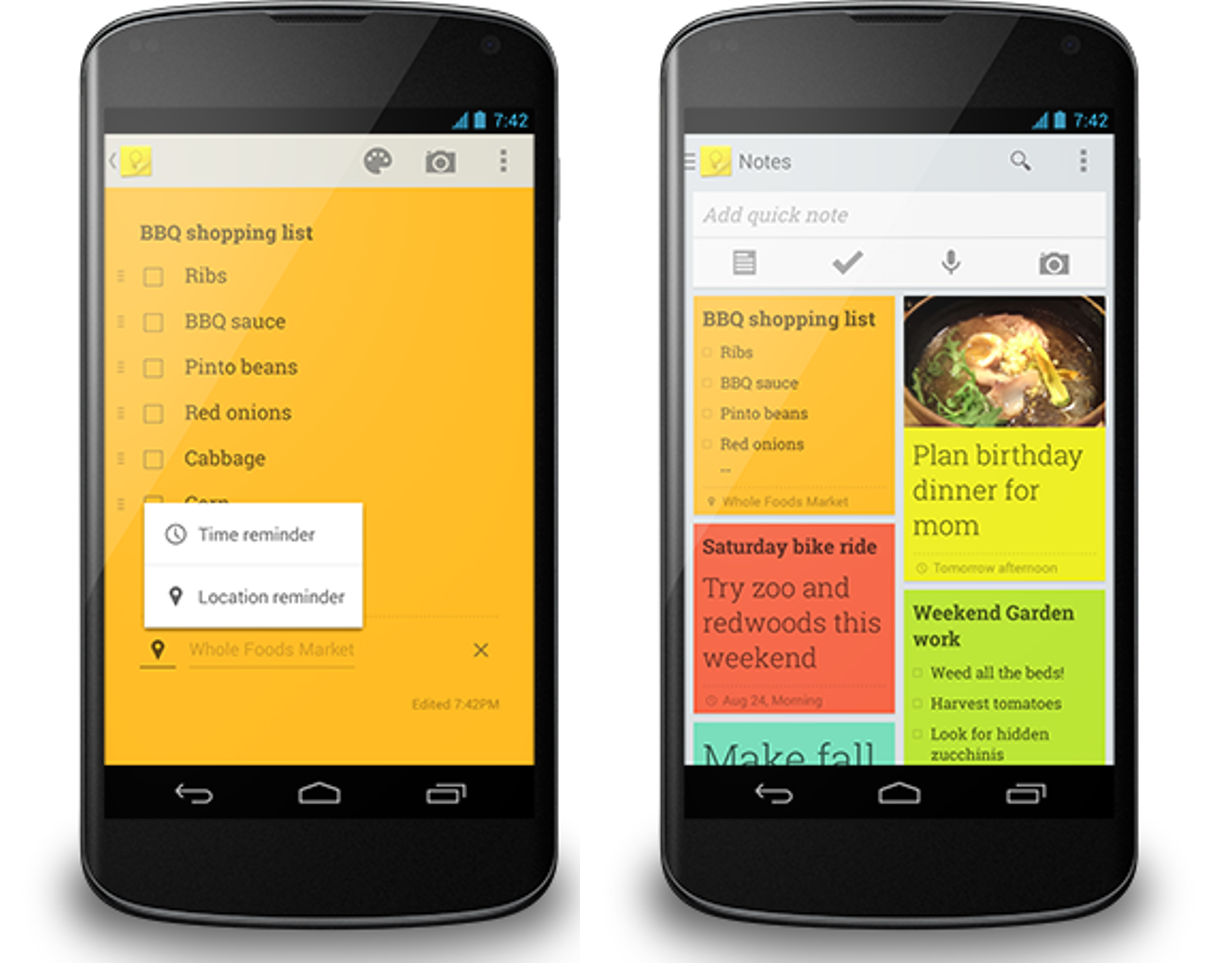
Google Updates Its Keep Note-Taking App With Reminders, Location-Based Alerts And Google Now Integration

When Google launched Keep for Android and the web a few months ago, it was essentially a basic note-taking application. Today, the company is launching a major update that turns it into a far more useful application. The update, which will start rolling out today, is centered around the new “Remind me” button, which now lets you schedule time-based reminders and location-based alerts that hook into Google Now.

When you walk into a grocery store now (and your grocery list is tagged with the store’s location), you will get a Google Now alert to remind you of all the milk and cereal you have to buy. To make this easier, Keep now also auto-completes nearby places.

As Google notes, you can obviously snooze any of these reminders and choose a time or place “that’s better for you.”


With this update, Google is also bringing a new navigation drawer to the app that lets you quickly switch between different accounts (great if you have a home and work to-do list, for example) and allows you to see all your upcoming reminders in one place.

Also new in this update is the ability to quickly add existing photos from your Android phone to Keep.

Google Now is quickly evolving to become Google’s main hub for alerts of all kinds and today’s Keep integration is yet another sign that the company continues to push Now’s feature set forward. Field Trip, which launched on Google Glass today, would be another natural candidate for Google Now integration, but for the time being, it’s still a separate product (as many of Google’s Niantic Labs experiments are).

-TechCrunch

Monday, August 26, 2013

Nokia Lumia 1020 review: Photographers, meet your camera phone


The big, circular bump on the back of the Lumia 1020 is impossible to miss. Place the phone on a table and it rests at an angle, slightly propped up by the protrusion. Hold it in your hand and you’re always fondling the circle’s edges.

But the phone’s uniquely shaped backside isn’t without reason. In fact, it’s there for a really great reason:Nokia’s Lumia 1020 packs the best smartphone camera available, one with a gargantuan 41-megapixel sensor, Xenon flash, six physical lens elements, and the software to support it all.

The Finnish company had previously trumped all smartphone cameras with its 41-megapixel PureView 808 last year. It won accolades and plenty of press buzz. The actual Symbian-powered phone, however, was mediocre. And where the Lumia 1020′s raised back looks fairly elegant and sleek, the PureView 808 looks as if somebody had just slapped an extra piece onto an already bulky phone’s back.

Which is to say, I’ve been eagerly waiting for Nokia to make the Lumia 1020 since the PureView camera made its debut. And luckily, this new Windows Phone-powered mobile does not disappoint.
Photo by Jim Merithew/WIRED
The Lumia 1020 is a refined piece of hardware. At 10.4mm thick (minus the camera) and 5.6 ounces, it’s both thinner and lighter than the Lumia 920. The familiar matte, polycarbonate shell — which comes in white, black and yellow — envelops the phone. The clicking sensation of the volume rocker, lock button and camera button all feel sturdier and more responsive. And the 4.5-inch 1280 by 768 resolution AMOLED display is bright and crisp. The battery lasted a full day in my testing, with regular use and plenty of photo-taking. And it would probably last longer than a day if you were caught without a charger.
Sample photograph from the Nokia Lumia 1020. Click to enlarge. Photo by Alexandra Chang/WIRED.
Most importantly, the camera is absolutely amazing. It takes better photos than any other camera phone and is just as good as most point-and-shoots in its price range (it’s $300 on contract from AT&T). The physical camera hasn’t changed much since the PureView 808. You take 38-megapixel photos in a 4:3 or 16:9 aspect ratio. The sensor uses pixel oversampling, stuffing seven pixels worth of data into a single pixel’s footprint. The results are undeniably sharp, clear images with tons of data for incredible digital zoom capabilities. The Lumia 1020 has up to 6x zoom. You’ll lose some clarity when you zoom in all the way, but for the most part, you can crop photos at your leisure without getting a grainy image.

Though you can take full, 38-megapixel resolution photos, the images saved to your camera roll are actually a more manageable 5 megapixels. You get the clarity of the shot without it taking up a huge amount of space in the phone’s 32GB memory.

Videos shot on the Lumia 1020 are also some of the best I’ve seen from a smartphone’s camera. Pixel oversampling gives you crisp-looking 1080p videos, and the image stabilization technology inside makes videos taken by even the shakiest hands easy to watch. Plus, a new microphone captures excellent sound quality to match the picture quality.


The camera software is just as impressive, and it’s the distinguishing feature that makes the Lumia 1020 a much better camera phone than the matching physical camera in the PureView 808. The Nokia Pro Cam app is easy to use, with plenty of power. If you leave everything as is, with all auto settings, you’ll take consistently great photos. The camera button makes it easy to focus, and lock focus, by pressing halfway down and holding there until you’re ready to press all the way to take a shot. But you can also customize plenty of settings — flash, white balance, focus, ISO, shutter speed and exposure — to make sure you get the absolute best shot. (You can adjust white balance and focus for video.)

The app makes it easy to tap a certain setting and adjust it in a radial menu. You’ll see how those adjustments will make a photo look through a live preview in the viewfinder — something I sorely missed in the original stock Windows Phone Camera app that came with the Lumia 920. If you know you want to change multiple settings at once, just drag the camera icon up and you’ll see multiple radial menus laid across the screen. Other bonuses include an exposure bracketing feature that lets you take multiple photos, three or five, at different exposures. And Nokia packs several exclusive “lenses” like Cinemagraph and Nokia Smart Cam — a tool to help you take action shots, remove moving objects, change people’s faces, and the like.

Sample photograph from the Nokia Lumia 1020. Click to enlarge. Photo by Alexandra Chang/WIRED.
Once you’ve taken your photo, you can crop from a full-res version by tapping a circular thumbnail at the top of the app. The tool lets you produce multiple closely cropped shots from a single photo. In one instance, I took a photo of a swimming hole and zoomed in super close to a fish that you could barely see in the original image. The caveat: Your full-res photos exist only in Nokia Pro Cam. You won’t be able to crop as closely in the camera roll, and the only way to get full-res photos out of Nokia Pro Cam is to connect the phone to a computer via USB. So if you really want to share or edit a full-res, rather than a 5-megapixel, image, you still need to physically wire the phone to a computer to transfer the larger files.

Sample photograph from the Nokia Lumia 1020. Click to enlarge. Photo by Alexandra Chang/WIRED.
Quickly editing and sharing even your regular photos is still a challenge on Windows Phone 8, however. The platform currently lacks the most popular photo apps, including Instagram, Snapseed, an up-to-date Flickr, 500px, and Snapchat. It’s clear that Microsoft, along with Nokia, are working to change this. Hipstamatic’s Oggl, which is available now, has a backdoor to Instagram, allowing you post to the popular photo sharing network, along with Facebook and Twitter. Vine is also going to make its way onto Windows Phone at some point — though they aren’t talking release dates yet, it will be a huge win for the platform once the app is available.

Beyond the camera, the Lumia 1020 is as good as any other Windows Phone 8 handset. The OS is always speedy and easy to use. The on-board apps work without problem. Typing on the touchscreen keyboard is decent, though not the best. But really, the main problem is that Windows Phone 8 is lagging behind iOS’ and Android’s app ecosystems. There still aren’t enough people using WP8 smartphones and so, not enough developers building quality apps for the platform. It’s slowly getting there, but for now, you just won’t get access to as many great apps on a Windows Phone, Lumia 1020 or otherwise.

Photo by Jim Merithew/WIRED
That said, if you want the absolute best camera on a smartphone, then the Lumia 1020 is for you. At $300 with a two-year contract, it’s the same price as an iPhone with equivalent storage, and its camera blows away the iPhone’s, along with all other smartphones we’ve tested this year. Nokia is leading the pack when it comes to smartphone imaging technology.

You just have to be OK with hitching your wagon to Windows Phone. It’s definitely trailing behind when it comes to the best apps, but who knows, maybe the Lumia 1020 and Nokia’s imaging SDK will be enough to spur developers to hop on.

WIRED Best. Camera. Phone. Hands. Down. Camera button is well-made and sturdy. Easy to focus and lock focus. Excellent audio quality for a smartphone. Really great on-board camera app. Good battery life. Slimmed down from its predecessors…

TIRED …but still bulky compared to other smartphones. Lagging app ecosystem with Windows Phone 8. Camera slow to launch out of the lock screen.

-Wired.com